

If you run a business or an agency with an active Facebook Page, you’ve probably noticed a frustrating pattern:
Dozens of prospective customers send messages like “Hi, how much is this?”, “Are you available?“, or “Can you send more details?“
Your team replies a couple of hours later. By then, the lead has gone cold, clicked on a competitor’s ad, or forgotten they even messaged you.
In 2026, treating your Facebook inbox like an unorganized, casual messaging thread is leaving thousands of dollars on the table. With email open rates dipping below 20%, Facebook Messenger consistently delivers 70% to 80% open rates and 3x higher response rates.
Here is your step-by-step guide to transforming your Facebook Page inbox from a chaotic chat drawer into a high-converting, 24/7 sales funnel.
Why Messenger Funnels Outperform Traditional Email in 2026
Traditional sales funnels depend heavily on website opt-in forms, slow email sequences, and manual CRM entries. The main problem is conversion friction.
Every time a prospect has to leave social media, check their inbox, and click a verification link, you lose between 30% to 50% of your potential buyers.
- Zero-Friction Entry: Prospects start a conversation with a single tap from your Facebook Ads, reels, or page header.
- Instant Engagement: Customers read and reply to Messenger chats in under 90 seconds, compared to hours for email.
- Two-Way Qualification: You can ask qualifying questions in real time and guide prospects directly to checkout.
Step 1: Replace the Chaotic Flat Inbox with a Visual CRM Pipeline
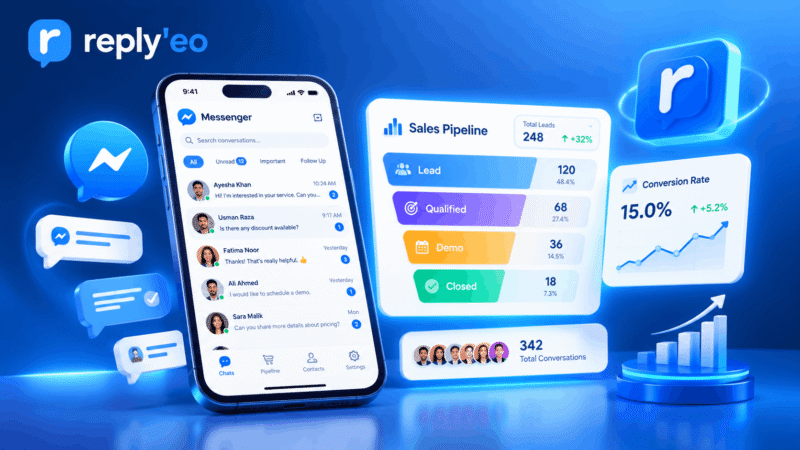
The standard Meta Business Suite inbox arranges all your chats in a single flat column. When managing hundreds of inquiries every week, high-ticket leads get lost under casual questions.
To turn conversations into reliable revenue, you need structured pipeline stages.
Using a dedicated Facebook Messenger CRM, you can easily organize every prospect into defined stages:
- New Lead (Top of Funnel): First-time inquiry asking about services or pricing.
- Qualified (Middle of Funnel): Prospect has shared their requirements, budget, or timeframe.
- In Negotiation (Bottom of Funnel): Custom proposal or demo booking link sent.
- Converted Customer: Paid client tagged for ongoing support, referrals, and upsells.
Step 2: Segment Leads with Color-Coded Custom Tags
A corporate client has very different purchasing power than an individual buyer. To maximize conversion, you must segment leads based on their intent and interests.
Whenever a customer chats with your page, apply customized tags directly to their conversation:
- Service or Plan Interest:
Tag: Agency Plan,Tag: E-Commerce, orTag: Starter - Buying Urgency:
Tag: Ready to Buy,Tag: Follow-up Tomorrow - Campaign Origin:
Tag: Facebook Ad Campaign,Tag: Organic Post
With smart tags, your sales team can filter high-intent prospects with one click and close deals faster.
Step 3: Run Safe, Rate-Limited Broadcast Follow-Ups
Once your audience is tagged and segmented, you don’t have to copy-paste the same message manually to 500 different people.
However, sending bulk messages on Messenger requires strict adherence to Meta’s messaging policies. Blasting too many messages too quickly risks getting your page flagged.
By leveraging safe bulk messaging tools, you get built-in protection:
- 3 msg/sec Rate-Limiting: Dispatches messages at a human-like, compliant pace that protects page health.
- Meta Message Tags Support: Safely apply approved tags like
CONFIRMED_EVENT_UPDATEandPOST_PURCHASE_UPDATEto reach users compliantly. - Targeted Audience Filters: Broadcast discount codes or updates strictly to leads tagged
Interested in E-Commerce.
Step 4: Centralize Multiple Client Pages in One Workspace
If you run an agency or manage multiple Facebook Pages, logging in and out of different accounts is exhausting and inefficient.
With multi-page agency management, your team can:
- Switch between 10+ client Facebook Pages in 1 click.
- Maintain separate tag taxonomies and CRM pipelines for each client.
- Assign team members to specific client inboxes without sharing master Meta logins.
Comparison: Default Inbox vs Automated Messenger CRM Funnel
| Feature | Default Facebook Inbox | ReplyEO Messenger Funnel |
|---|---|---|
| Lead Organization | Flat unorganized chat list | Visual multi-stage pipeline CRM |
| Segmentation | Basic stars and unread mark | Unlimited custom color tags |
| Broadcast Follow-ups | Manual copy-paste only | Safe 3 msg/sec rate-limited broadcasts |
| Multi-Page Management | Tedious account switching | Unified 1-click workspace |
Conclusion: Turn Your Messenger Into a Revenue Engine
Automating your Facebook sales funnel doesn’t require complicated chatbots that break whenever Meta updates its Graph API.
By organizing your chats with a structured CRM pipeline, tagging high-intent buyers, and running targeted broadcasts, you can turn conversations into consistent revenue.
Ready to automate your inbox? Explore all ReplyEO features and start your free trial today!
